
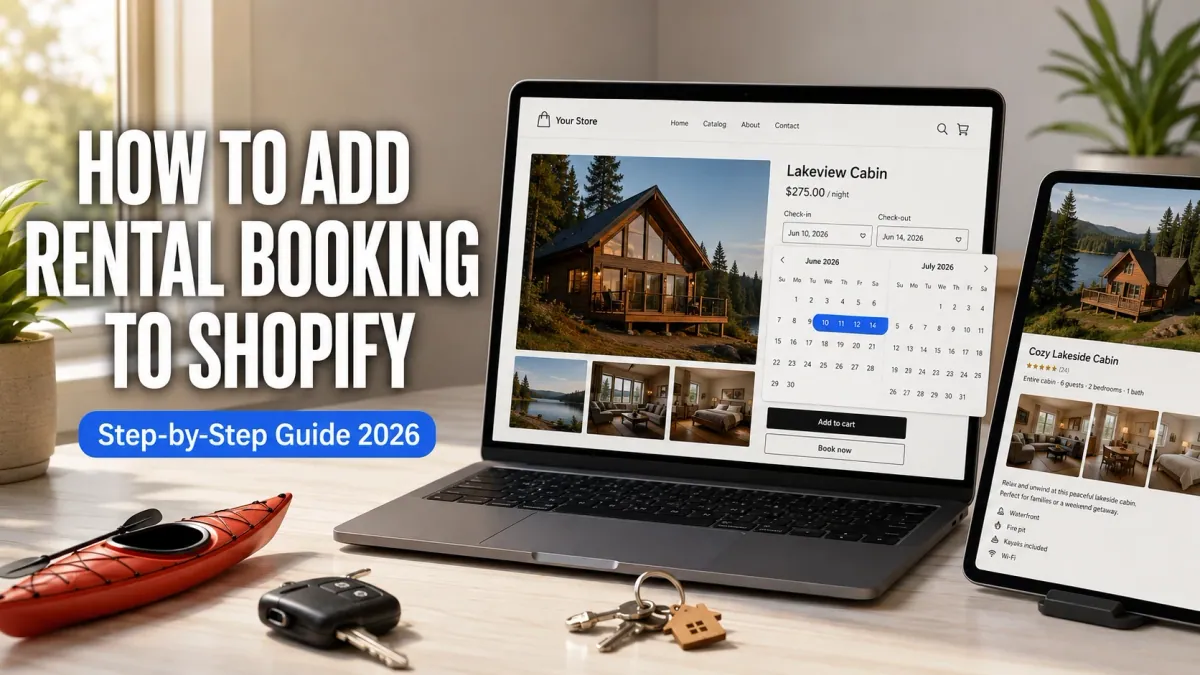
Shopify does not support rental booking out of the box. There is no native date range picker, no availability calendar, and no way for a customer to select check-in and check-out dates on a product page. If you sell vacation stays, rent kayaks, lease equipment, or run any business where customers reserve something for a period of time, you need a booking app to bridge that gap.
This guide walks through the full setup using Cowlendar, the most-reviewed booking app on the Shopify App Store with 2,061 reviews at 4.9 stars. Every step works on the free plan. No code, no developers, no Shopify Plus required.
What you need before you start
You need a Shopify store with at least one product created. That product will become your bookable rental item. If you sell a vacation cabin, the product is the cabin. If you rent kayaks, the product is the kayak. Cowlendar connects to existing Shopify products and adds the booking layer on top, so the product needs to exist first.
You also need a rough idea of your availability schedule: which days are bookable, how long each rental period can be, and whether you want to collect a deposit or full payment at booking.
That is it. No theme modifications, no Liquid code, no third-party hosting.
Step 1: Install Cowlendar from the Shopify App Store
Go to the Shopify App Store and install Cowlendar. The free plan includes every feature with up to a free plan with all features. You do not need a credit card to start.
After installing, Cowlendar appears in your Shopify admin under Apps. Open it to reach the dashboard.
Step 2: Create a booking service for your rental
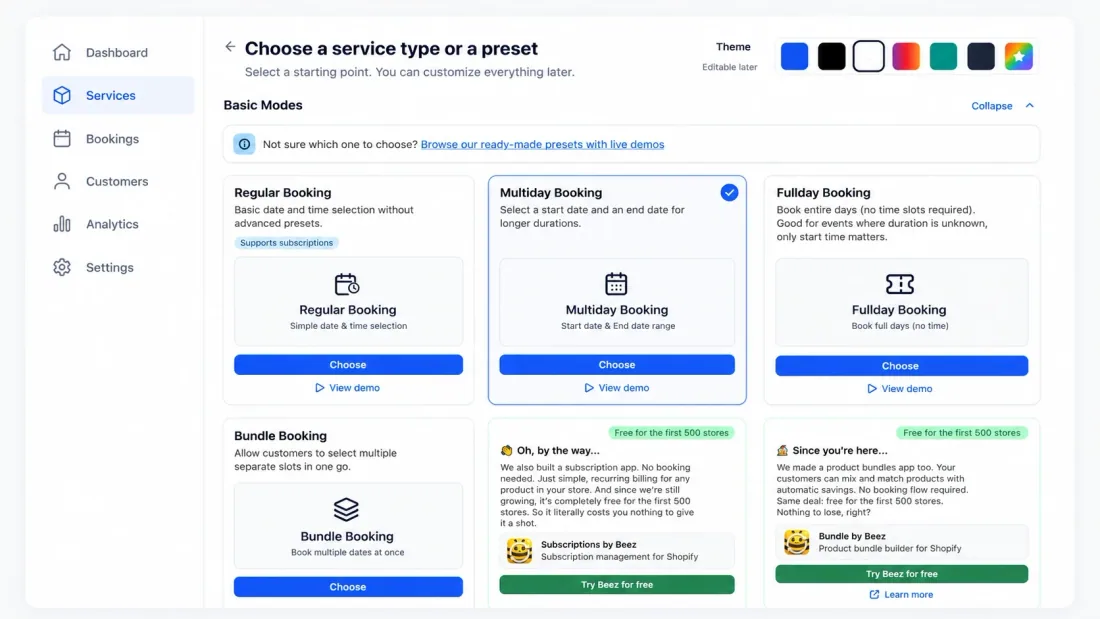
In the Cowlendar dashboard, click "Create a Service." This is where you define what customers are booking.
Service name: Use a clear name your customers will recognize. "Lakeside Cabin, 2-Night Minimum" or "Single Kayak Rental" works better than "Product 1."
Booking type: Select "Multiday Booking." This is the Airbnb-style date range selector where customers pick a check-in date and a check-out date. The calendar shows available dates and blocks dates that are already booked.
Duration settings: Set your minimum and maximum rental period. A vacation cabin might have a 2-night minimum and a 30-night maximum. A kayak rental might be 1 day minimum, 7 days maximum.
Link to Shopify product: Connect this service to the Shopify product you created earlier. The booking widget will appear on that product's page automatically.
Step 3: Set your availability and blocked dates
In the service settings, define when your rental is available for booking.
Working days: Select which days of the week are bookable. Most vacation rentals are available 7 days a week. Equipment rentals might only be available Monday through Saturday.
Blocked dates: Block any dates when the rental is unavailable. If your cabin is under maintenance from October 1 to October 15, block those dates. If you already have bookings from another platform (Airbnb, VRBO), block those dates manually now and set up calendar sync in the next step so future bookings sync automatically.
Buffer time: Add buffer time between bookings if you need turnover time. A vacation rental might need a 1-day buffer between guests for cleaning. A kayak might need zero buffer.
Step 4: Sync with Airbnb, VRBO, and Google Calendar
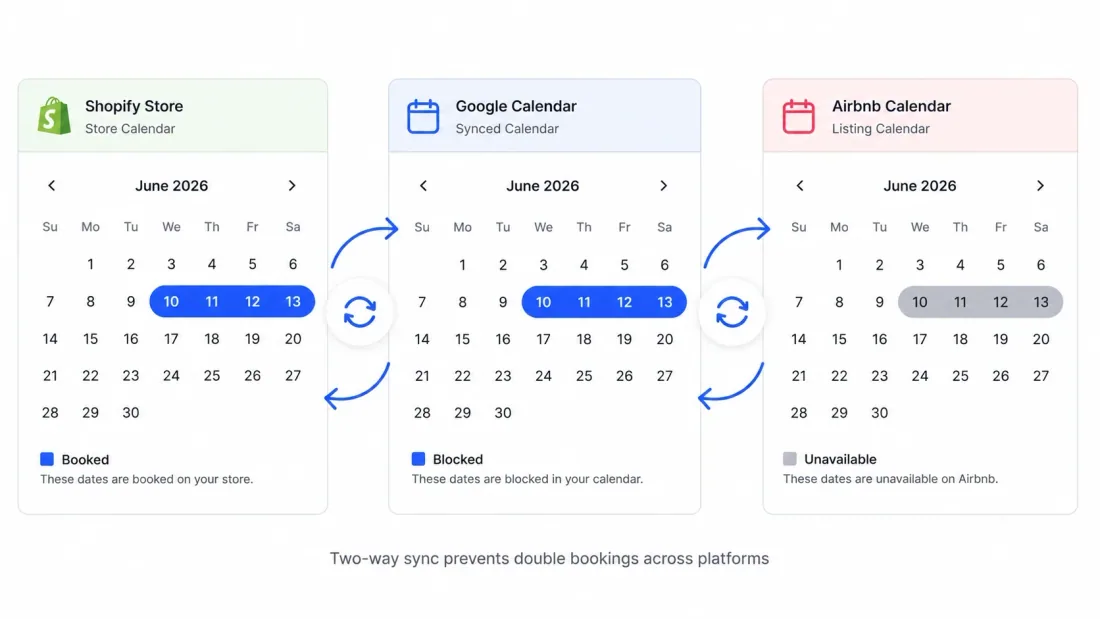
If your rental is listed on multiple platforms, calendar sync prevents double bookings. Cowlendar supports iCal sync (the same protocol Airbnb and VRBO use) and two-way Google Calendar and Outlook sync on all plans including the free plan.
For Airbnb/VRBO sync: In Cowlendar settings, add your iCal feed URL from Airbnb. When someone books on Airbnb, those dates are blocked in Cowlendar automatically. When someone books on your Shopify store through Cowlendar, those dates are blocked on Airbnb.
For Google Calendar sync: Connect your Google account in Cowlendar settings. Bookings appear in your Google Calendar, and events in your Google Calendar block Cowlendar availability. This works in both directions and updates in real time.
This single feature prevents the most common and most expensive problem in rental businesses: double bookings across platforms.
Step 5: Configure deposits and payments
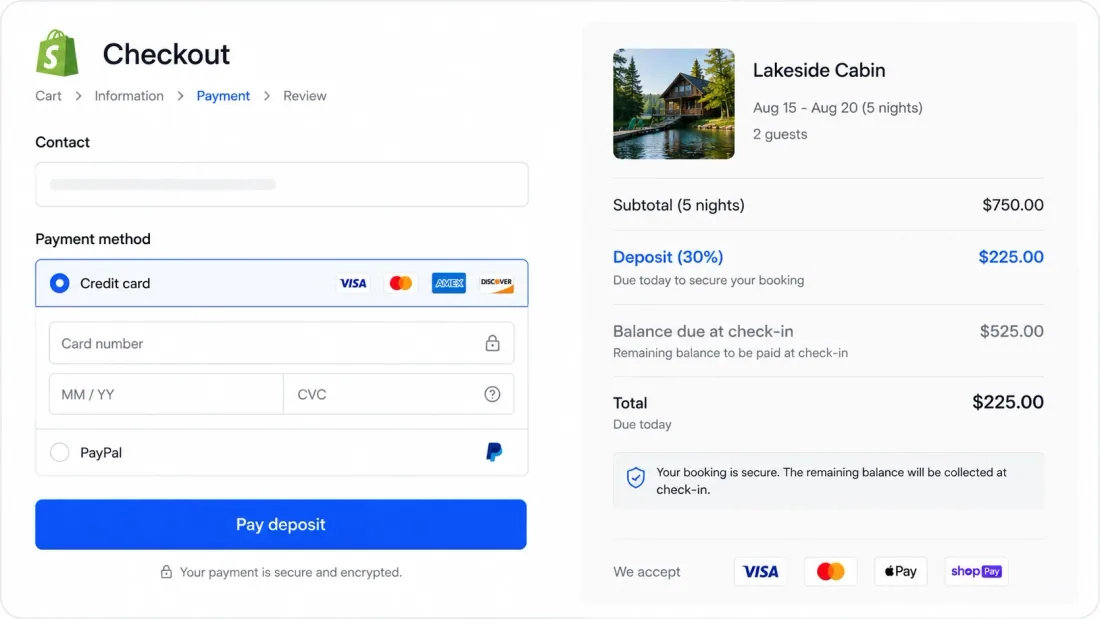
Cowlendar supports three payment options through Shopify's native checkout:
Full payment at booking: The customer pays the entire rental cost upfront through Shopify checkout. Standard for kayak rentals, equipment rentals, and short-term activity bookings.
Deposit at booking: Collect a fixed dollar amount or a percentage of the total at booking. Collect the remaining balance later (in person, by invoice, or before check-in). Common for vacation rentals where the total is higher and guests expect a deposit-first model.
Split payment: Charge a deposit at booking and automatically charge the balance at a later date. Both charges go through Shopify's payment processing.
All three options work with whatever payment methods you already have configured in Shopify: Stripe, PayPal, Shop Pay, Apple Pay, and the rest.
Step 6: Add custom booking form questions
For rental businesses, you often need information beyond just the dates. Cowlendar lets you add custom questions to the booking form that customers fill out before checkout.
Examples for vacation rentals: "Estimated arrival time," "Number of guests," "Any accessibility requirements," "Pet policy acknowledgment."
Examples for equipment rentals: "Driver's license number," "Experience level," "Damage waiver acknowledgment."
Examples for activity rentals (kayaks, bikes, tours): "Number of participants," "Preferred size (S/M/L for wetsuits)," "Emergency contact."
All answers are attached to the booking and visible in your Cowlendar dashboard and Shopify order details.
Step 7: Test a booking from the customer's perspective
Before going live, place a test booking on your own store. Open your product page where the booking widget now appears.
You should see a calendar with available dates highlighted. Select a check-in date and a check-out date. Unavailable dates (blocked or already booked) should be grayed out. After selecting dates, any custom form questions appear. After filling those in, the customer proceeds to Shopify checkout where the deposit or full payment is processed.
Confirm that the booking appears in your Cowlendar dashboard, in your connected Google Calendar (if configured), and that the confirmation email reaches the customer.
What types of rental businesses use this setup
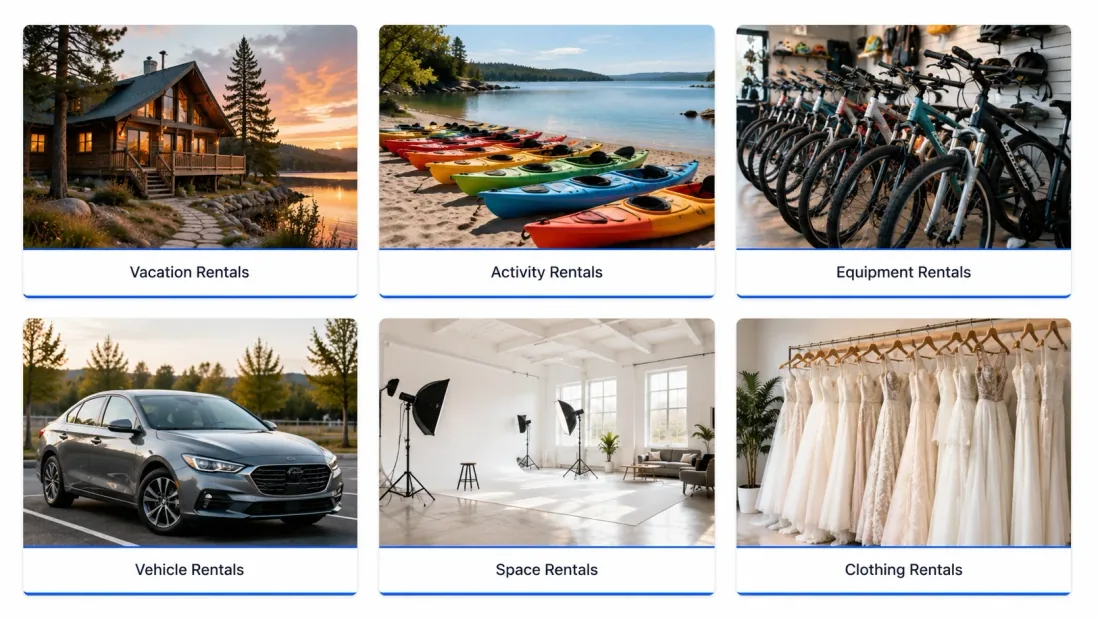
This same process works for any business where customers reserve something for a date range:
Vacation rentals and holiday properties: Cabins, villas, beach houses, apartments, glamping tents, treehouses. iCal sync with Airbnb prevents double bookings across platforms.
Vehicle rentals: Cars, vans, motorcycles, scooters, boats. Per-vehicle availability blocking ensures the same car is never rented to two people on the same day.
Equipment rentals: Cameras, construction tools, ski gear, camping equipment, musical instruments, DJ equipment. Per-item blocking with custom form questions for damage waivers.
Activity and experience rentals: Kayaks, paddleboards, bicycles, surfboards, snorkel gear. Often combined with group booking if multiple units are available simultaneously.
Clothing and accessory rentals: Wedding dresses, tuxedos, designer handbags, costumes. Multiday booking with buffer time between rentals for dry cleaning.
Space rentals: Meeting rooms, photography studios, co-working desks, event venues, parking spots. Date and time-based availability with capacity limits.
Cowlendar handles all of these from a single dashboard because the underlying mechanics are the same: a date range picker, availability blocking, deposit collection, and calendar sync.
How Cowlendar compares to other rental options on Shopify
Cowlendar is the most-reviewed booking app on the Shopify App Store with 2,061 reviews at 4.9 stars, used by 22,500+ stores. The free plan includes all features. For a detailed comparison with other rental apps, read the full Best Shopify Rental Apps in 2026 breakdown.
The short version: Booqable and RentalFlow are standalone rental software that integrates with Shopify but lives outside it. Cowlendar is native to Shopify, meaning bookings are Shopify orders, payments go through Shopify checkout, and you manage everything from one admin.
FAQ
Can Shopify handle vacation rental bookings?
Not natively. Shopify has no built-in date range picker or availability calendar. You need a booking app like Cowlendar to add rental functionality. Once installed, customers can select check-in and check-out dates directly on your product page and pay through Shopify checkout.
How do I prevent double bookings on my Shopify rental store?
Connect Cowlendar's two-way calendar sync with Google Calendar, Outlook, or iCal (for Airbnb/VRBO). When a booking is made on any platform, all connected calendars update automatically in real time. This prevents the same item or property from being booked by two different customers for the same dates.
Can I collect a deposit for vacation rentals on Shopify?
Yes. Cowlendar supports deposits through Shopify's native checkout on all plans including the free plan. Set a fixed dollar amount or a percentage of the total. The deposit is processed through whatever payment methods you have configured in Shopify (Stripe, PayPal, Shop Pay, etc.).
How do I sync my Shopify rental calendar with Airbnb?
In Cowlendar settings, add your Airbnb iCal feed URL. Cowlendar checks the feed regularly and blocks dates that are booked on Airbnb. When someone books through your Shopify store, those dates are blocked on Airbnb via the same iCal sync. This is the same protocol Airbnb uses with all third-party calendar tools.
What is the best app for renting kayaks, bikes, or equipment on Shopify?
Cowlendar handles equipment and activity rentals with multiday booking, per-item availability blocking, deposit collection, and custom booking form questions (for damage waivers, sizing, experience level). It is the most-reviewed booking app on Shopify with 2,061 reviews at 4.9 stars, and the free plan includes all features with up to a free plan with all features.
Do I need Shopify Plus to add rental booking?
No. Cowlendar works on every Shopify plan, including Basic Shopify. No custom code, no theme modifications, and no Shopify Plus subscription required. Install the app, create a service, connect it to a product, and the booking widget appears automatically.
How long does it take to set up rental booking on Shopify?
Most merchants complete the full setup in under 30 minutes. That includes installing the app, creating a service, setting availability, connecting calendar sync, and placing a test booking. The booking widget appears on your product page immediately after setup.
Originally published on the Cowlendar blog. This article keeps its original publication history; the page layout has been refreshed.
Originally published Aug 16, 2026.


 Built for Shopify


