
Online shoppers expect to see real-time availability when booking services. Yet Shopify has no built-in scheduling calendar. In today’s fast-paced world, displaying your services in a clear calendar format is no longer optional – it’s a must.
A calendar lets customers instantly see dates and times, building trust and simplifying booking. In fact, a professional, automated booking process “improves trust and increases conversions”. By adopting an on-site calendar, merchants can meet modern customer expectations (24/7 booking, instant confirmation, reminders) and stand out from competitors.
This post explains the benefits of a booking calendar, shows how easy it is with Cowlendar’s new Event Calendar feature, and compares alternatives – proving Cowlendar is the top choice for 2026.
Why a Calendar Matters for Shopify Service Stores
Shopify’s platform is built for selling products, not managing schedules. If your store offers time-based services – appointments, rentals, classes, or tickets – you need an on-site calendar app to display availability. A calendar makes it easy for customers to see when they can book.
This cuts down on endless back-and-forth with customers and reduces the risk of double-bookings. As one expert blog notes, adding booking tools “meets modern customer expectations” and delivers “increased convenience, fewer no-shows, and more satisfied clients”. In other words, a visible calendar signals professionalism. Without it, customers might find the process confusing or untrustworthy.
Even Google recommends using event markup to highlight dates and availability in search results. In short, a calendar is the simplest way to show your service schedule at a glance, 24/7, and that drives real business benefits.
Key Benefits of a Service Calendar
Always-on booking. With a calendar, shoppers can see and reserve slots any time, even outside business hours. This 24/7 convenience lets you capture bookings that might otherwise get lost.
Automated reminders, fewer no-shows. Integrated booking systems send confirmations and reminders automatically, so clients remember their appointments. One review notes that “automated reminders help ensure clients remember their bookings, reducing costly gaps in your schedule”.
Boosted credibility and conversions. Showing real-time availability and instant confirmations builds trust. Studies and Cowlendar’s own blog explain that a professional, automated booking process increases customer confidence and sales. For example, customers who can schedule a consultation often feel more confident to buy, improving overall conversion rates.
Clarity and user experience. A visual calendar is more transparent than lists or buttons. Customers quickly see open slots and service details in a clean interface. This clarity makes booking simple and reduces confusion. In fact, one source says apps should offer “multiple layouts” (month, list, etc.) and “mobile-responsive design” to meet user needs – exactly what Cowlendar’s calendar provides.
Higher traffic and engagement. Events calendars help drive traffic and community around time-based promotions. TheShopCalendar site highlights that displaying events can “drive traffic and sales,” “build customer community,” and “increase engagement”. In practice, when customers can easily find and share upcoming classes or workshops, your store benefits from word-of-mouth and repeat visits.
Each of these benefits – availability, reminders, trust signals, user-friendliness, and SEO traffic – adds up.
By 2026, customers will come to expect them. If competitors offer a built-in schedule and you don’t, you’ll lose bookings. A calendar on your site not only showcases your services clearly, but also works behind the scenes to improve SEO and marketing (we’ll cover this below).
Who Can Use an Event Calendar (Use Cases)
Service-based Shopify stores of almost any kind can leverage an event calendar. Cowlendar’s help docs list a wide range of perfect applications: “Workshops and classes, salon or spa appointments, restaurant bookings, fitness schedules, tours, rentals, coworking spaces, and more”. Some concrete examples include:
Fitness, yoga & sports classes. Gyms or studios display weekly class schedules. Members can instantly see open sessions and book spots.
Beauty, spa & wellness appointments. Salons show available hairstyling or massage times by day. Clients pick a slot without phoning in.
Rentals & bookings. Car, bike or equipment rental shops use a calendar to prevent overlapping reservations. For instance, a tour company lists excursion dates; a car rental service marks vehicles booked vs. free.
Workshops & events. Art workshops, cooking classes, or venue events have fixed dates. A calendar drives sign-ups by showing upcoming event days.
Restaurants & dining events. Even restaurants can use a calendar – for example, special tasting menus or cooking classes can be scheduled and booked via the same system.
Coaching & consulting. Business or personal coaches can display open consulting hours, allowing clients to choose a time and book directly.
In short, if your store deals with anything time-based or appointment-oriented, an event calendar brings huge value. Cowlendar’s calendar is designed to handle all these cases and more, turning Shopify products or variants into bookable slots seamlessly.
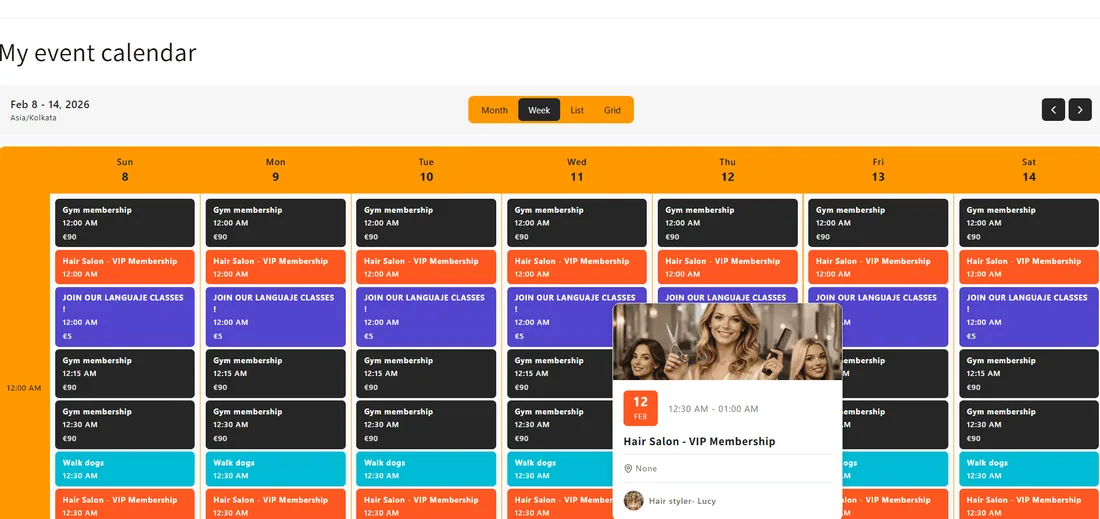
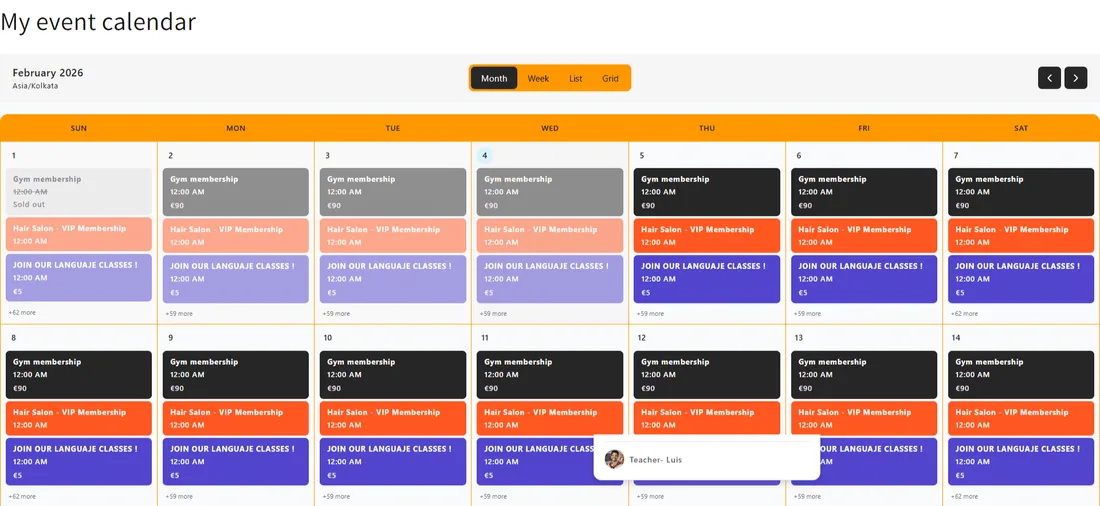
Screenshot: A Cowlendar event calendar embedded in a Shopify page, showing a week view of service appointments (e.g. restaurant bookings). Customers can toggle different views (month, week, grid) to find available slots
Introducing Cowlendar’s Event Calendar Feature
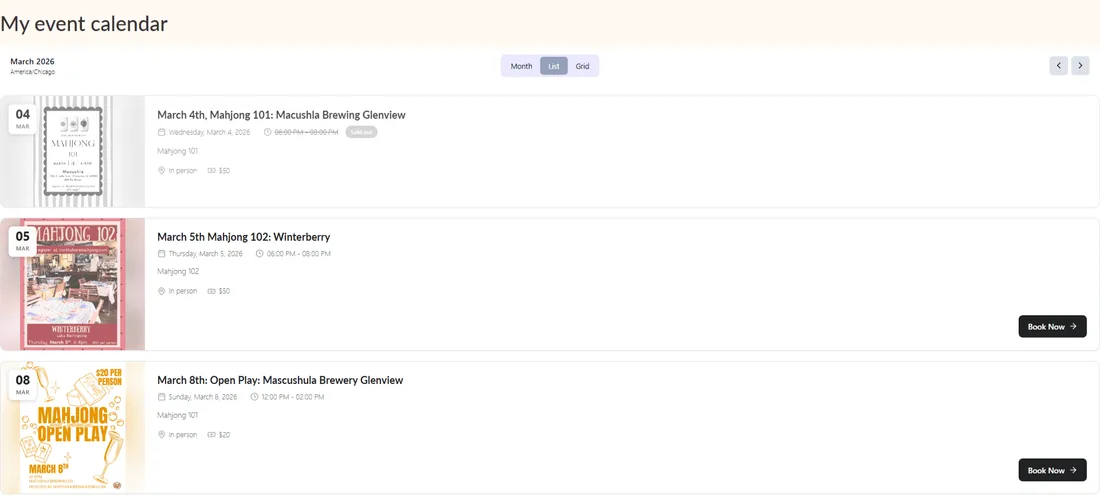
Cowlendar recently released a brand-new Event Calendar – one of its most requested features. This tool lets merchants display all their services inside a clean, interactive calendar widget anywhere on their Shopify store. Key features include:
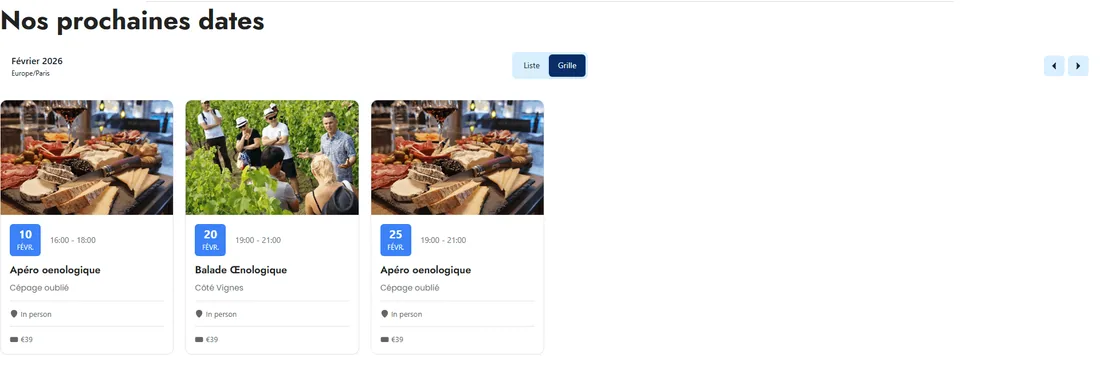
Multiple calendar views: Visitors can switch between month, week, list or grid views to browse your schedule (the list view is used on mobile by default). This flexibility means each customer sees the format they prefer.
Real-time availability: The calendar syncs with your product inventory. If a slot is booked (for example, someone reserved a class or rental), it is immediately marked unavailable. This prevents double-booking and always shows up-to-date openings.
Seamless Shopify integration: Cowlendar’s calendar is built as a Shopify theme extension. You can add it via the native theme editor – no coding needed. In the editor, you simply “Add section” and choose the Cowlendar Event Calendar component on any page. Within moments, your calendar is live and matches your store’s look.
Customization: Merchants can fully match the calendar to their brand. Cowlendar allows you to customize colors, text, and even whether weekends show. You can create different calendars (one for each location or type of service) and give each a custom title or timezone.
Calendar configuration: The app supports recurring events (ideal for weekly classes), multi-day events, and detailed description fields. You can set how events appear (compact vs. expanded cards), show end times, and decide what happens when a customer clicks an event (e.g. open the booking widget or go to a product page).
All these features come right out of the box. As Cowlendar’s documentation highlights, it’s perfect for any scenario listed above. For example, a salon owner could choose to display only certain services in the calendar by adding them under Settings → Event Calendar. The end result is a mobile-friendly, branded calendar on your Shopify site, turning shoppers into bookers without extra work.
Quick Setup: Adding Cowlendar to Your Store
Getting started with Cowlendar’s calendar is simple:
Install the Cowlendar app. Find “Booking App Schedule – Cowlendar” on the Shopify App Store and add it to your store. (The free Regular plan already includes unlimited bookings.)
Create your services. In Shopify, services are products that customers book. In the Cowlendar app dashboard, add each service (e.g. “Yoga Class”, “Car Rental 1 day”, “Haircut”) and define its availability rules.
Enable the Event Calendar. In the Cowlendar admin, go to Settings → Event Calendar. Click “Add service” and select which of your services should appear in the calendar. This lets you control exactly what customers see.
Embed the calendar on a page. In the Shopify Admin sidebar, go to Online Store → Themes → Customize. Using the theme editor, navigate to the page where you want the calendar. Click “Add section”, then under “Apps” choose Cowlendar event calendar. The calendar widget will instantly appear on that page.
Customize appearance. Back in Cowlendar’s Event Calendar settings, adjust the look and feel (colors, layout, first day of the week, etc.) until it matches your brand. You can also enable/disable specific views (month, week, list, grid) to tailor the experience.
No coding or external tools are required – everything is done through Shopify’s built-in editor and Cowlendar’s settings pages. In minutes, your store will proudly display a service calendar. When customers click on a date or event, they get an instant booking popup (or redirect to the product page if needed), as Cowlendar turns each calendar entry into a bookable slot.
Pro tip: Enable the week and grid views for high-frequency schedules, or stick to month view for simpler event listings. On mobile, the calendar will automatically use a list view for easy scrolling.
Comparing Shopify Calendar Apps: Why Cowlendar Stands Out
In a recent comparison, Cowlendar earned +1900 reviews and 4.9 rating, reflecting merchant satisfaction across industries. What makes Cowlendar different?
True Shopify integration: Some calendar widgets (like TheShopCalendar) only display events and promotions. Cowlendar goes further by linking directly to your Shopify products/services and checkout. When a customer books via the calendar, it creates a real Shopify order.
All-in-one booking + calendar: Unlike basic calendars, Cowlendar is a full scheduling system. It handles payments (deposits, full pre-payments), POS integration for in-person sales, waitlists, staff/team assignments, and more. You get both a calendar display and a robust booking backend.
Feature-rich yet easy: HulkApps notes that merchants “might favor Cowlendar for its comprehensive features… particularly for more complex business requirements,” while other apps often trade off depth for simplicity. Cowlendar supports Google Calendar sync, Zoom integration, SMS/email reminders, custom booking forms, and more – features usually reserved for high-end plans in other apps. Yet Cowlendar’s interface remains user-friendly, and even the free plan offers professional features at no cost.
Performance and design: The calendar is optimized to load quickly and match your theme. Users praise how it fits seamlessly into stores. (For reference, The Shop Calendar’s own app listing emphasizes mobile-responsive design and speed.) Cowlendar offers multiple layouts and deep color customization so your calendar never feels tacked-on or slow.
Pricing and value: Cowlendar’s plans start with a free option (no booking limits), then scale up. Compared to rivals, Cowlendar includes many advanced features without costly add-ons. A cost analysis shows Cowlendar’s top plan is competitively priced while still offering more – for example, the free plan already has unlimited appointments and multi-language support.
Proven track record: As mentioned, Cowlendar leads in user reviews. In side-by-side tests, experts have noted that merchants may choose Cowlendar for its power and others for simpler UI. With over 1900 reviews and new features (like the Event Calendar), Cowlendar’s community and support are top-notch.
SEO & Visibility: Boosting Your Search Rankings
Adding a service calendar doesn’t just help customers – it also boosts your SEO and online presence:
Rich search results: By using proper event/appointment schema markup, your bookings can appear as rich snippets. Google encourages event markup to “enhance your listings in search results with rich snippets, displaying details like date, location, and ticket information”. This means when someone searches for your workshop or rental, Google can show the dates directly in results, making your listing more eye-catching.
Content and keyword strategy: SEO experts advise writing site content (blog posts, landing pages) with service and location keywords, and embedding clear “Book Now” CTAs. In fact, one marketing guide notes that no matter if customers search on Google, DuckDuckGo, or ChatGPT, well-structured content with booking calls-to-action will surface in all of them.
Local/SEM signals: For local businesses, calendars tie in with Google Business Profile. The same SEO guide recommends claiming and optimizing your Google Business account and even adding a “Book” button there. When customers search “salon near me” or “car rental [city]”, having a structured calendar (and Google booking link) makes you more likely to appear. In summary, search engines reward clarity and structure. By showing exactly when you’re available, you increase the chance that both Google and AI assistants will direct customers to your store.
By combining Cowlendar’s calendar with good SEO practices – keyword-targeted service pages, rich event markup, and Google Business integration – you’ll help more people find your availability online. The calendar itself generates crawlable event data, which is essentially fresh, structured content that search engines love.
Bonus: Extra Tips for Maximizing Bookings
Optimize your calendar placement. Put a “Book Now” link or calendar widget on high-traffic pages (homepage, service pages, blog posts). Embedding the calendar directly on each service’s page is great for SEO and UX.
Write SEO-friendly content. Alongside your calendar, publish short blog posts or FAQs about your services (“How to book a tour,” “What to expect at a salon appointment”). Use keywords plus calls-to-action (“Book your service online”). This helps your content show up in AI searches and Google results.
Use reminders and follow-ups. Enable Cowlendar’s automatic email/SMS reminders. Fewer no-shows mean more appointments. You can also send follow-up offers (e.g. coupons for next booking) via Cowlendar’s post-booking emails.
Leverage Google & social profiles. Link your Cowlendar booking page in your Google Business Profile and social media. Many customers search “book service” directly on Google or Facebook. The more places your availability appears, the higher your chances of capture.
Review and adjust regularly. Check your calendar analytics (Cowlendar provides reports) to see which services fill up and which don’t. Use that insight to tweak prices, add classes on busy days, or promote slow slots.
By combining a visual calendar with smart SEO and engagement strategies, your Shopify store will be ready to dominate service bookings in 2026. Cowlendar is here to make that journey smooth and successful!
Conclusion
In 2026, a Shopify store that offers any kind of appointment, rental or service needs an event calendar. It’s the fastest way to increase conversions, build trust, and keep customers informed. A calendar shows availability clearly, streamlines bookings, and works around the clock – all of which modern shoppers expect. Cowlendar’s new Event Calendar makes it incredibly easy: install the app, add your services, and embed the calendar with a click.
Compared to other apps, Cowlendar offers the strongest feature set for Shopify merchants – multiple views, real-time syncing, customizable design, staff/room logic, and more – all while fitting seamlessly into your store’s theme. With top ratings and a free plan that already includes unlimited bookings, it’s both user-friendly and professional.
Don’t let your store fall behind: a booking calendar is not just a nice add-on, it’s essential marketing and service infrastructure. By installing Cowlendar’s Event Calendar, you make scheduling transparent for customers and give your business a competitive edge.
Ready to get started? Try Cowlendar for free today, add an Event Calendar to your Shopify pages, and watch your bookings grow.
Originally published on the Cowlendar blog. This article keeps its original publication history; the page layout has been refreshed.
Originally published Feb 4, 2026.




 Built for Shopify


